---
title: 了解用戶組
description: 本文概述了用戶組是什麼、它如何幫助您以及您需要了解的有關其功能的所有信息。
---
[跳到內容](https://learn.movus.com.au/zh-tw/knowledge/了解用戶組#main-content)
- [中文 - 繁體](https://learn.movus.com.au/zh-tw/knowledge/%E4%BA%86%E8%A7%A3%E7%94%A8%E6%88%B6%E7%B5%84)
- [Bahasa Indonesia](https://learn.movus.com.au/id/knowledge/memahami-grup-pengguna)
- [English](https://learn.movus.com.au/knowledge/user-groups)
- [Español](https://learn.movus.com.au/es/knowledge/comprender-los-grupos-de-usuarios)
中文 - 繁體
顯示翻譯的子功能表
[提交申請](https://learn.movus.com.au/zh-tw/knowledge/kb-tickets/new?hsLang=zh-tw)
![Movus-horizontal-Orange-White-WT-1.png\]](https://learn.movus.com.au/hs-fs/hubfs/Movus-horizontal-Orange-White-WT-1.png?height=39&name=Movus-horizontal-Orange-White-WT-1.png)
- [Support](https://movus.com.au/get-in-touch)
- [MachineCloud Login](https://app.movus.com.au/)
開啟主要導覽
關閉主要導覽
- [Support](https://movus.com.au/get-in-touch)
- [MachineCloud Login](https://app.movus.com.au/)
- - [中文 - 繁體](https://learn.movus.com.au/zh-tw/knowledge/%E4%BA%86%E8%A7%A3%E7%94%A8%E6%88%B6%E7%B5%84)
- [Bahasa Indonesia](https://learn.movus.com.au/id/knowledge/memahami-grup-pengguna)
- [English](https://learn.movus.com.au/knowledge/user-groups)
- [Español](https://learn.movus.com.au/es/knowledge/comprender-los-grupos-de-usuarios)
中文 - 繁體
顯示翻譯的子功能表
- [提交申請](https://learn.movus.com.au/zh-tw/knowledge/kb-tickets/new)
- [登錄到儀表板](https://app.movus.com.au/login)
[登錄到儀表板](https://app.movus.com.au/login)
你好。我們該怎樣幫助你?
- 搜尋欄位為空,無法提供建議。
1. [幫助中心](https://learn.movus.com.au/zh-tw/knowledge?hsLang=zh-tw)
2. [用戶管理](https://learn.movus.com.au/zh-tw/knowledge/%E7%94%A8%E6%88%B6%E7%AE%A1%E7%90%86?hsLang=zh-tw)
# 了解用戶組
## 本文概述了用戶組是什麼、它如何幫助您以及您需要了解的有關其功能的所有信息。
#### 什麼是用戶組?
用戶組是指儀表板的用戶管理功能,您可以藉此對用戶帳戶進行分組和組織。
這是作為我們現有組功能的擴展添加的,它允許您對設備進行分組,以改進用戶和權限管理。
為了幫助您更好地理解此功能,本文將說明:
1. [用戶組如何幫助您](https://learn.fitmachine.com/knowledge/user-groups#how-it-helps-you)
2. [如何創建用戶組](https://learn.fitmachine.com/knowledge/user-groups#how-to-create-user-group)
3. [如何編輯用戶組](https://learn.fitmachine.com/knowledge/user-groups#how-to-edit)
4. [如何授予用戶組訪問設備組的權限](https://learn.fitmachine.com/knowledge/user-groups#granting-usergroup-access)
請注意,本文假設您的組織已經創建了設備組。如果您不確定如何操作,請先閱讀[此處](https://learn.fitmachine.com/knowledge/groups)的這篇文章。
#### 用戶組如何幫助我?
4 個主要好處是您可以:
1. **一次將多個用戶分配到一個設備組**
將用戶分組後,您就不必單獨編輯用戶來更改他們有權訪問的設備。相反,您可以創建一個用戶組,然後快速輕鬆地將該組內的所有用戶分配到他們需要訪問的任何設備組。
例如,您可以創建一個由在布里斯班工廠使用泵的一線員工組成的用戶組,然後將他們分配到您的布里斯班泵設備組。現在,該用戶組中的所有員工都可以訪問您的布里斯班水泵。
2. **一次更改多個用戶的權限 對用戶進行**
分組意味著您可以同時更改該組內所有用戶的權限,對於他們有權訪問的每個設備組。使用用戶組,您可以確保用戶僅在您希望他們擁有的地方大規模擁有管理員訪問權限,並確保他們無法編輯他們沒有權限的組。
例如,您可以將一線員工用戶組中的所有用戶設置為對您的 Brisbane 泵具有*管理員*訪問權限,但對 Brisbane 壓縮機*具有隻讀訪問權限。*您可以設置三個權限級別:讀取、寫入或管理。這些在我們的[關於用戶權限](https://learn.fitmachine.com/knowledge/about-user-permissions)一文中有更詳細的解釋。重要的是,用戶必須擁有[標準用戶類型](https://learn.fitmachine.com/knowledge/user-types)或更高級別被授予寫入或管理訪問權限。受限用戶只能被授予讀取權限。
3. **輕鬆劃分您的員工,以便用戶只能在他們的儀表板上看到他們需要的資產**
能夠創建用戶組並將他們分配到設備組,這意味著用戶在他們的儀表板上只能看到他們被授予訪問權限的設備。
例如,除非前線工作人員獲得訪問權限,否則他們將看不到布里斯班泵和壓縮機以外的任何其他組。
4. **確保用戶只收到與他們相關的通知**
使用用戶組,用戶將只會收到他們有權訪問的設備的通知。這可以使用我們的[報警通道功能](https://learn.fitmachine.com/knowledge/alarm-channels)進一步定制。
#### **如何創建用戶組**
要創建用戶組,您必須對您的組織具有[標準用戶](https://learn.fitmachine.com/knowledge/user-types)訪問權限。
如果這樣做,請在“組”側欄上選擇您的組織名稱,然後單擊藍色的“添加”按鈕。接下來,輸入組的名稱,單擊“用戶組”,然後單擊“添加組”(如下所示)。
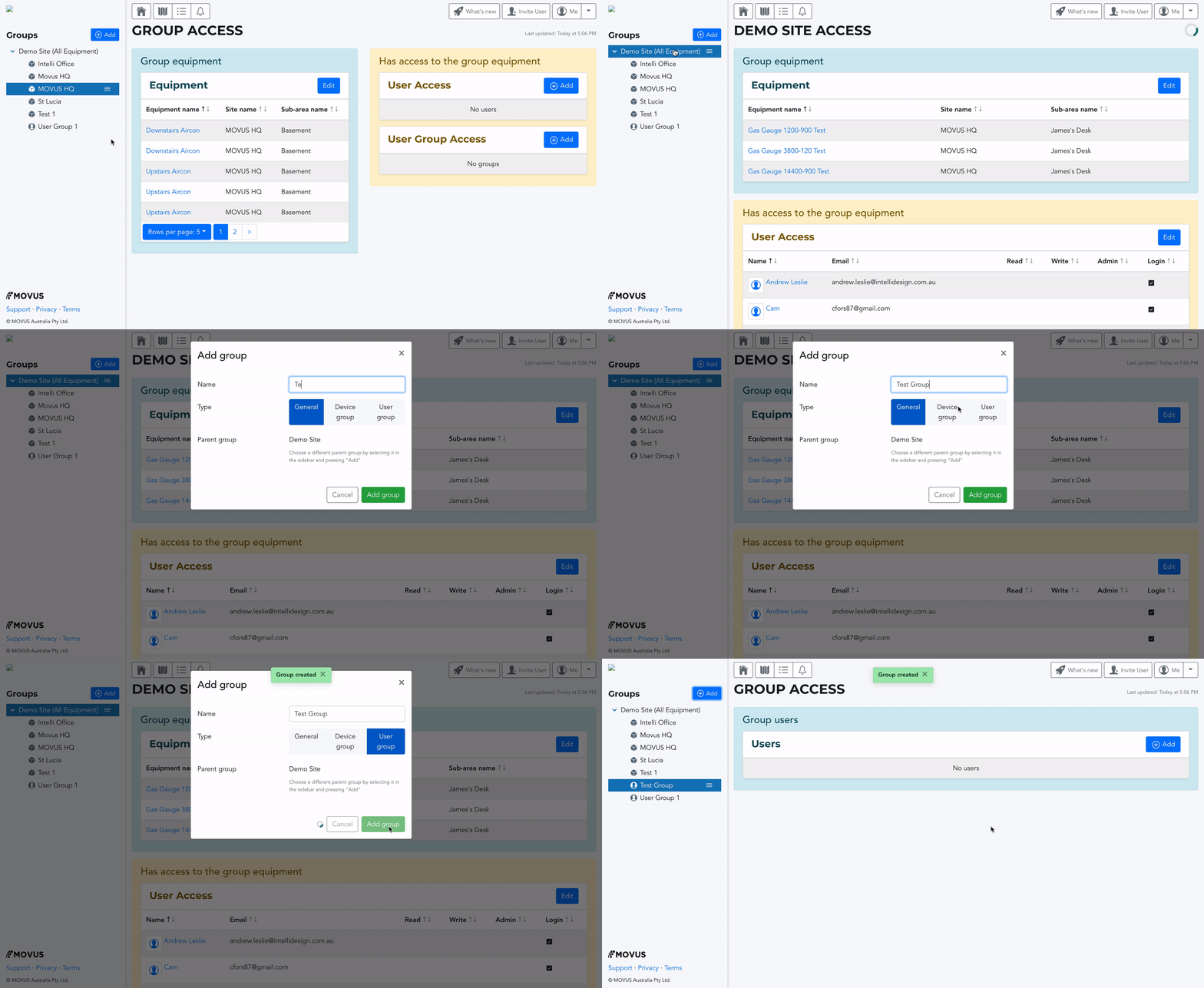
在這種情況下,“用戶組”類型是唯一的相關組類型。您可以根據資歷、位置、他們負責的資產或您組織團隊的任何其他方式對用戶進行分組。
常規組是一種 高級分組,可用於對設備和用戶組進行分組。這旨在使導航更容易,並幫助您將相關組放在一起。例如,這可能是布里斯班工廠,布里斯班泵和布里斯班壓縮機可能被分組,以及您的一線員工用戶組。
Device Group是一個 設備組。這就是您可以根據位置、類型或任何相關性對相關資產進行分組的方式。在這個例子中,這將是布里斯班水泵。
#### 如何編輯用戶組
要編輯用戶組並添加或刪除用戶,請單擊邊欄中用戶組名稱旁邊的三行。這將彈出一個下拉菜單。在此菜單上,您可以選擇添加子組、重命名組、刪除組或管理組訪問權限。單擊“管理組訪問”將調出管理頁面。
請注意:如果父組是設備組,則任何子組也必須是設備組。用戶組也是如此。
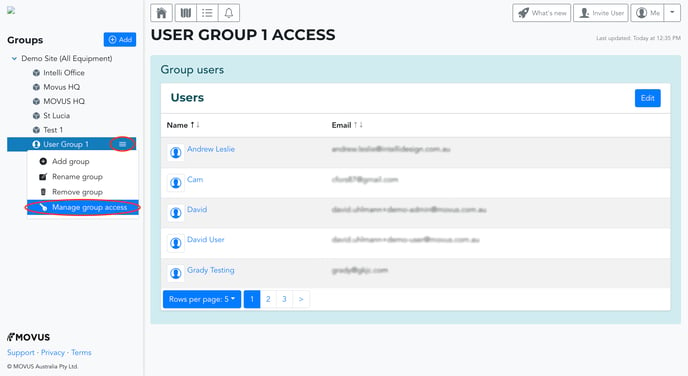
進入管理頁面後,單擊“組用戶”欄上的藍色“添加”按鈕(請參見下面的 gif)。接下來,選擇任何相關用戶。您可以單擊“全部包含”或“不包含”來批量添加或刪除用戶。
請記住向下滾動並單擊用戶列表底部的綠色“更新”按鈕以保存您的更改。然後您可以單擊“返回訪問摘要”返回管理頁面。
要退出此頁面,請單擊屏幕頂部的任何導航按鈕。
#### **如何授予用戶組訪問設備組的權限**
創建用戶組後,您可以授予該用戶組訪問任何相關設備組的權限。為此,您需要訪問相關設備組的管理頁面。這與編輯用戶組的過程相同。只需單擊邊欄中設備組名稱旁邊的三行,然後單擊“管理組訪問”。
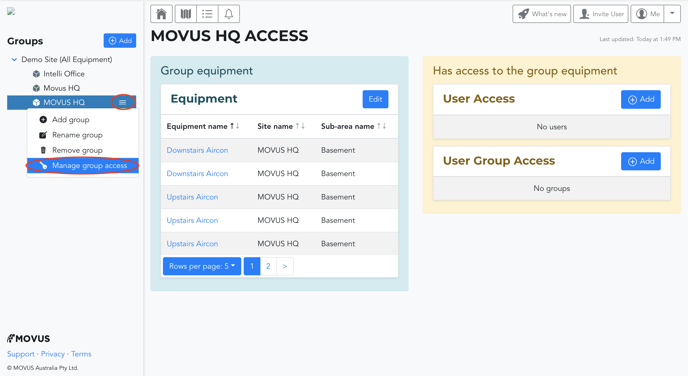
在此頁面上,您可以:
- 查看和編輯(添加/刪除)組內的設備
- 向該設備組的單個用戶(用戶訪問權限)或用戶組(用戶組訪問權限)授予讀/寫/管理權限。
要授予用戶組訪問設備組的權限,請單擊“用戶組訪問權限”旁邊的藍色“添加”按鈕。找到您要授予訪問權限的用戶組,然後選擇是否要授予他們讀取、寫入或管理訪問權限。我們的文章[關於用戶權限](https://learn.fitmachine.com/knowledge/about-user-permissions)中解釋了每個權限級別的含義。請記住點擊頁面底部的綠色“更新”按鈕以保存您的更改。
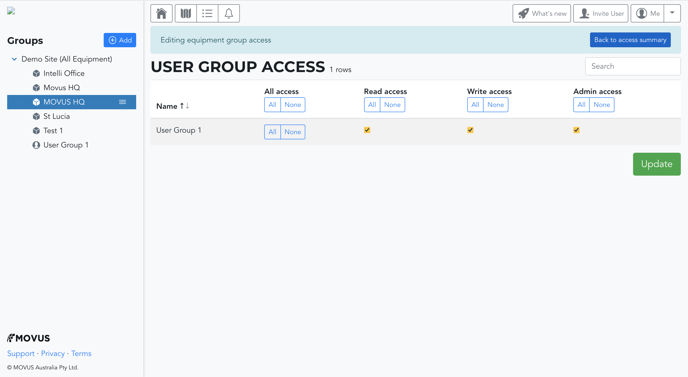
當您單擊“用戶訪問”旁邊的藍色“添加”按鈕時,這與授予單個用戶訪問組的過程相同。但是,在此頁面上,您將看到所有用戶的列表,而不是用戶組。
\---
謝謝閱讀。一如既往,如果您有任何問題或疑慮,請[在此處聯繫 MOVUS 支持。](https://learn.movus.com.au/knowledge/kb-tickets/new?__hstc=112871067.ebae3b9bb5a85a746c1f3b76013c2836.1660092706344.1671076216661.1671149841811.91&__hssc=112871067.90.1671149841811&__hsfp=1914294887&hsLang=zh-tw)
- [入門](https://learn.movus.com.au/zh-tw/knowledge/%E5%85%A5%E9%96%80?hsLang=zh-tw#main-content)
- [入職 FitMachines](https://learn.movus.com.au/zh-tw/knowledge/%E5%85%A5%E9%96%80?hsLang=zh-tw#%E5%85%A5%E8%81%B7-fitmachines)
- [設置您的儀表板](https://learn.movus.com.au/zh-tw/knowledge/%E5%85%A5%E9%96%80?hsLang=zh-tw#%E8%A8%AD%E7%BD%AE%E6%82%A8%E7%9A%84%E5%84%80%E8%A1%A8%E6%9D%BF)
- [用戶管理](https://learn.movus.com.au/zh-tw/knowledge/%E7%94%A8%E6%88%B6%E7%AE%A1%E7%90%86?hsLang=zh-tw)
- [特徵](https://learn.movus.com.au/zh-tw/knowledge/%E7%89%B9%E5%BE%B5?hsLang=zh-tw#main-content)
- [系統特點](https://learn.movus.com.au/zh-tw/knowledge/%E7%89%B9%E5%BE%B5?hsLang=zh-tw#%E7%B3%BB%E7%B5%B1%E7%89%B9%E9%BB%9E)
- [FitMachine 功能](https://learn.movus.com.au/zh-tw/knowledge/%E7%89%B9%E5%BE%B5?hsLang=zh-tw#fitmachine-%E5%8A%9F%E8%83%BD)
- [FitPower 功能](https://learn.movus.com.au/zh-tw/knowledge/%E7%89%B9%E5%BE%B5?hsLang=zh-tw#fitpower-%E5%8A%9F%E8%83%BD)
- [FitMachine 診斷工具](https://learn.movus.com.au/zh-tw/knowledge/%E7%89%B9%E5%BE%B5?hsLang=zh-tw#fitmachine-%E8%A8%BA%E6%96%B7%E5%B7%A5%E5%85%B7)
- [額外功能](https://learn.movus.com.au/zh-tw/knowledge/%E7%89%B9%E5%BE%B5?hsLang=zh-tw#%E9%A1%8D%E5%A4%96%E5%8A%9F%E8%83%BD)
- [警報器](https://learn.movus.com.au/zh-tw/knowledge/%E8%AD%A6%E5%A0%B1%E5%99%A8?hsLang=zh-tw#main-content)
- [報警概述](https://learn.movus.com.au/zh-tw/knowledge/%E8%AD%A6%E5%A0%B1%E5%99%A8?hsLang=zh-tw#%E5%A0%B1%E8%AD%A6%E6%A6%82%E8%BF%B0)
- [FitMachine 警報器](https://learn.movus.com.au/zh-tw/knowledge/%E8%AD%A6%E5%A0%B1%E5%99%A8?hsLang=zh-tw#fitmachine-%E8%AD%A6%E5%A0%B1%E5%99%A8)
- [FitMachine維護](https://learn.movus.com.au/zh-tw/knowledge/fitmachine%E7%B6%AD%E8%AD%B7?hsLang=zh-tw)
- [更多信息](https://learn.movus.com.au/zh-tw/knowledge/%E6%9B%B4%E5%A4%9A%E4%BF%A1%E6%81%AF?hsLang=zh-tw#main-content)
- [故障排除和常見問題解答](https://learn.movus.com.au/zh-tw/knowledge/%E6%9B%B4%E5%A4%9A%E4%BF%A1%E6%81%AF?hsLang=zh-tw#%E6%95%85%E9%9A%9C%E6%8E%92%E9%99%A4%E5%92%8C%E5%B8%B8%E8%A6%8B%E5%95%8F%E9%A1%8C%E8%A7%A3%E7%AD%94)
- [技術信息](https://learn.movus.com.au/zh-tw/knowledge/%E6%9B%B4%E5%A4%9A%E4%BF%A1%E6%81%AF?hsLang=zh-tw#%E6%8A%80%E8%A1%93%E4%BF%A1%E6%81%AF)
- [計費](https://learn.movus.com.au/zh-tw/knowledge/%E6%9B%B4%E5%A4%9A%E4%BF%A1%E6%81%AF?hsLang=zh-tw#%E8%A8%88%E8%B2%BB)
- [船運](https://learn.movus.com.au/zh-tw/knowledge/%E6%9B%B4%E5%A4%9A%E4%BF%A1%E6%81%AF?hsLang=zh-tw#%E8%88%B9%E9%81%8B)
- [草稿](https://learn.movus.com.au/zh-tw/knowledge/%E8%8D%89%E7%A8%BF?hsLang=zh-tw)
- [Support](https://movus.com.au/get-in-touch)
- [MachineCloud Login](https://app.movus.com.au/)
[](https://movus.com.au/)
幫助中心
版權所有 © 2026,MOVUS Australia Pty Ltd